Route Planner - GetWay
Logi WayMaps & Navigation
3.839.00 Reviews
- Version
- 1.1.30
- Installs
- 100.00K
- Age Rating
- Everyone
Screenshots
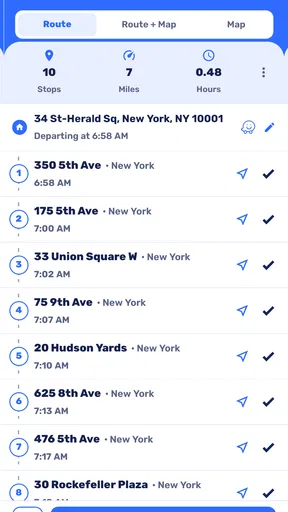
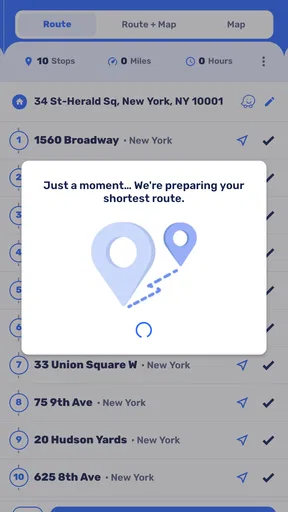
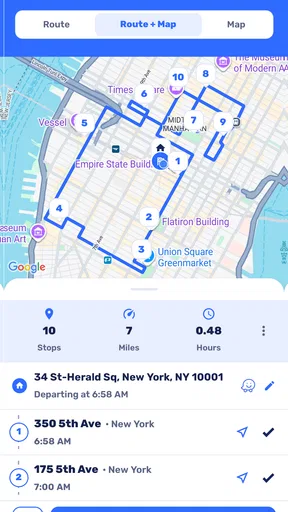
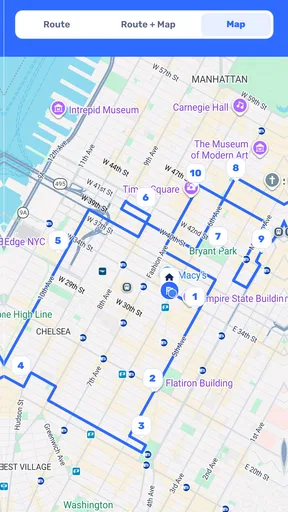
Our Review of Route Planner - GetWay
 Analysis by Appyee
I approached Route Planner - GetWay as the kind of travel app that has to prove its value quickly. A route planner is easy to try once, but much harder to keep on a phone when familiar navigation tools already handle everyday journeys. My experience with this app is that its appeal comes from a focused promise: helping me plan a trip with less wasted movement rather than turning navigation into a large, complicated system.
GetWay is a free Maps & Navigation app from Logi Way, intended for everyone and available on Android devices running at least Android 5.0. It has passed the early-adopter stage, with over 100 thousand installs, a 3.8 average from hundreds of ratings, and dozens of written reviews. Those figures suggest a useful but not universally loved tool, which matches my impression: it can be convenient for deliberate trip planning, yet it does not automatically replace every navigation app already in use.
What Route Planner - GetWay feels like in the first week
The first thing I noticed is that the app is easier to understand when I treat it as a planning companion, not merely as a turn-by-turn replacement. The short description calls it a route planner, and that is the right expectation. Its strongest moment is before leaving: I can think about where I need to go, consider the shape of the journey, and try to make the trip more direct instead of accepting the first route that appears.
That distinction matters for people who organize several stops in one outing. A normal map app is often opened only after I am already moving or when I need immediate directions. GetWay makes more sense when I have a little time to prepare. For example, if I need to visit a pharmacy, collect a parcel, and reach a friend across town, I can approach the trip as one planned sequence rather than three disconnected searches. The practical benefit is not a flashy feature; it is the habit of deciding the order of travel before I start.
During the first week, I would use it for journeys where distance and order matter: errands, appointments, short work trips, or a day with multiple destinations. I would not begin with a complicated holiday itinerary. A new planning tool is easier to judge with a familiar local route, because I can notice whether the suggested path actually saves effort and whether the app fits naturally into my routine.
The app’s free entry point also makes that trial uncomplicated. I can install it, test it against routes I already know, and decide whether its planning approach is useful before committing money. There are in-app purchases ranging from $13.99 to $369.99 per item, so I would pay attention to any purchase screen and make sure the available functions justify the cost for my particular use. The free label is attractive, but it should not be read as a promise that every possible capability is included without charge.
A realistic everyday test
My preferred test would be a Saturday of errands. I would enter the places I genuinely need to visit, compare the planned sequence with the order I would normally choose, and then check the result against local knowledge. If the app helps me avoid crossing the same area twice, that is meaningful value. If it produces a route that looks efficient on a map but is awkward because of parking, entrances, one-way streets, or the timing of an appointment, I would treat it as a planning suggestion rather than an unquestionable instruction.
That workflow reveals one of the app’s less obvious trade-offs. A shorter route is not always a better route. A slightly longer path may be preferable if it reduces backtracking, makes the stops easier to remember, or leaves room for a fixed appointment. GetWay is most useful when I make those decisions consciously. It can organize the route, but I still need to apply common sense about opening times, traffic conditions, accessibility, and how long each stop will take.
Another useful first-week habit is to plan the route before leaving and then review it once more at the start of the trip. That small pause prevents me from discovering halfway through the journey that the order of stops does not suit the day. It also helps me notice whether the app is saving real time or simply presenting information in a different way from my usual map application.
Who gets value immediately
GetWay is a natural fit for people who regularly combine several destinations. It may also appeal to anyone who dislikes improvising a route while already on the road. Parents arranging several pickups, independent workers moving between appointments, and travelers trying to make a compact day plan are more likely to notice its purpose than someone who only needs directions to one familiar location.
I also see value for users who enjoy preparing a journey the night before. Planning in advance can reduce the mental load of deciding where to go next, especially when the day includes unfamiliar places. The app gives that preparation a dedicated space instead of leaving the whole task scattered across searches, notes, and memory.
On the other hand, a person who wants live navigation first and route planning second may feel more comfortable with a larger, established maps platform. If most of my trips are simple journeys from home to one destination, opening a separate planner may add an extra step without delivering a noticeable improvement. That is an important early conclusion: the app earns attention through multi-stop planning, not through being a universal answer to every travel question.
Why the value either survives or fades after the first month
The novelty of a new route planner wears off quickly. After the first few experiments, I would keep GetWay only if it became part of a repeatable travel routine. The question is not whether it can produce an appealing route once; it is whether I remember to open it whenever a suitable journey appears.
For me, the strongest recurring use would be weekly planning. A regular delivery round, a set of errands on a particular day, or repeated visits across a city gives the app a chance to become a practical habit. Each time it reduces backtracking or makes the order of stops clearer, the benefit is easy to understand. The value is quieter than a dramatic discovery, but that is exactly what can make a planning tool last.
There is also a useful separation between planning and navigation. I can use GetWay to think through the journey, then rely on the navigation tool I already trust for the actual drive or walk. That may sound like a limitation, but it can be a sensible workflow. A dedicated planner does not have to replace every other map function to be worthwhile. It only needs to make the preparation stage better enough that I willingly keep it installed.
Still, this two-app approach creates friction. If I have to copy destinations manually, check the same route in another application, or repeatedly correct details, the time saved by planning can disappear. The long-term question is therefore practical: does the route produced by GetWay fit smoothly into the rest of my travel routine? If the answer is yes, it has a clear role. If the answer is no, my normal map app will probably win through convenience.
Maintenance is part of the experience
A navigation app is never completely finished from a user’s point of view. Roads change, places move, travel habits change, and phone operating systems evolve. GetWay’s current version is 1.1.30, which shows that the app has continued beyond its original release on March 22, 2020. I would still judge it by how dependable it feels in present-day use rather than by the existence of a version number alone.
My maintenance routine would be simple: keep the app updated through the normal app-store process, check important routes before leaving, and avoid treating a planned path as a substitute for current road awareness. That is especially important for unfamiliar areas. A route may be logically short while being inconvenient at a particular time, and no planning app should remove the need to confirm the real-world situation before departure.
There is a second kind of maintenance that users often overlook: maintaining their own saved travel habits. If I use the app only occasionally, I may forget how I prefer to arrange stops or where its planning controls are located. A short, repeatable workflow helps. I would enter destinations in a consistent order, review the complete journey, and make any human adjustments before starting. The fewer decisions I leave until I am already moving, the more useful the app becomes.
For people who plan complex routes, I would also keep a simple backup note with the key destinations and the intended order. That is not a criticism unique to GetWay; it is sensible travel practice. A route planner can organize a journey, but relying on one screen for every detail can become stressful if the phone battery, connection, or circumstances create a problem.
Where fatigue begins
The main source of fatigue is repetition. If every trip requires entering the same information again, the app may feel like work rather than help. A planner needs to save enough mental effort to justify the planning stage. The more often I travel to one destination, the less patience I have for a process that does not feel immediate.
Another possible frustration is the gap between map efficiency and lived efficiency. A route can look short while ignoring the realities that matter to me: a difficult turn, an inconvenient stop order, a crowded area, or the need to carry items between locations. This is why I would never judge GetWay solely by the line drawn on the map. Its output is a starting point for a decision, not a replacement for local knowledge.
The purchase structure may also affect long-term comfort. Because the app is free to install but includes in-app items from $13.99 to $369.99, I would want to understand exactly what a paid item adds before buying. For a casual user, a high-priced option could make the app feel disproportionate to the problem it solves. Someone who uses route planning professionally or very frequently may evaluate the cost differently, but occasional travelers should be cautious and begin with the free experience.
The rating of 3.8 is another reason I would approach it with realistic expectations. It is not a warning to avoid the app, but it does suggest that the experience will not be equally satisfying for everyone. My own recommendation would be to test it on known routes, not on an important journey where an unfamiliar workflow could create pressure. That approach answers the most important practical question: whether the app suits my habits before I depend on it.
How it compares with familiar alternatives
The usual alternative is a broad maps application that combines search, directions, location information, and often live travel context in one place. Those apps are generally better when I need immediate guidance, a nearby business, or a quick answer while already traveling. Their advantage is convenience and familiarity.
GetWay has a narrower opportunity. It can be the better choice when my problem is not finding one place but organizing several places into a sensible journey. A general map may show all the pieces, while a dedicated route-planning mindset encourages me to consider the whole day. The trade-off is that I may need another tool for the final navigation stage or for information outside the planning task.
That comparison makes the decision fairly clear. Choose GetWay when route structure is the recurring problem. Choose a full-service maps app when search, live guidance, place details, and spontaneous changes matter more than deliberate preparation. Keeping both is reasonable if each has a distinct job, but keeping GetWay solely because it is free does not create lasting value.
Who should keep it installed
I would keep it on my phone if I regularly arrange multi-stop trips and find myself wasting time deciding what to visit first. It is also worth keeping for people who like to prepare travel rather than make decisions at every turn. The app’s everyone rating makes it approachable for a broad audience, but suitability still depends more on travel style than age.
I would skip it if my journeys are nearly always one destination at a time, if I strongly prefer a single all-in-one navigation application, or if route planning feels slower than simply starting directions. I would also hesitate to make it central to a demanding professional workflow until I had tested its reliability across the exact kinds of trips I make. A free installation is a low-risk experiment; it is not, by itself, proof that the app will replace a mature navigation system.
After the first month, the deciding factor is habit. If I open GetWay before a busy day because it reliably clarifies the order of my stops, it has earned space. If I remember it only when writing a review, the novelty has not turned into recurring value.
My final view is cautiously positive. Route Planner - GetWay is a focused travel utility from Logi Way that makes the most sense as a preparation tool for multi-destination journeys. I appreciate that it encourages me to think about the complete route instead of reacting one stop at a time. At the same time, I would keep my expectations grounded, verify important plans, and compare its convenience with the navigation tools I already use.
Its lasting strength is not a single impressive trip, but the small amount of confusion and backtracking it can remove from repeated travel. If that is a problem I face often, the app deserves a real trial and possibly a permanent place on my phone. If I only need occasional directions, a familiar full-service map will probably remain the simpler choice.
Verdict
Strengths of Route Planner - GetWay
- Plans routes with multiple stops in one trip.
- Offers clear turn-by-turn navigation for everyday journeys.
- Helps compare route options before starting navigation.
- Useful for delivery drivers and frequent travelers.
- Supports trip planning without needing several separate apps.
Limitations of Route Planner - GetWay
- Some advanced features may require a subscription or in-app purchase.
- Route accuracy can depend on map data and network coverage.
- Battery usage may increase during long navigation sessions.
- Traffic updates may vary by region and data availability.
- The interface may feel overwhelming for first-time users.
Similar Picks in This Category
View All
Uber - Request a ride
Uber Technologies, Inc.4.7


inDrive. Rides with fair fares
® SUOL INNOVATIONS LTD4.8

Yandex Go: Taxi Food Delivery
Mikromobilnost LLC Belgrade4.8

Bolt: Request a Ride
Bolt Technology4.8

Rapido: Bike-Taxi, Auto & Cabs
Rapido Bike Taxi4.8
Frequently Asked Questions
What is Route Planner - GetWay used for?
Route Planner - GetWay is designed to help users plan and organize journeys by creating routes between multiple locations. It can be useful for everyday travel, road trips, deliveries, sightseeing, or business visits where stopping at several destinations is necessary. Before downloading, consider whether its route-planning tools match your needs, especially if you require advanced navigation, public-transit information, or highly specialized logistics features.
Does Route Planner - GetWay provide turn-by-turn navigation?
Route Planner - GetWay primarily focuses on planning and arranging routes rather than necessarily replacing a full navigation application. Depending on the version and device, it may work alongside mapping or navigation services to help you follow the planned journey. Users should check the current app description and permissions before installing, because available navigation, map display, voice guidance, and integration features can vary between Android and iOS releases.
Can I plan a route with multiple stops in Route Planner - GetWay?
Planning journeys with several destinations is one of the main reasons to use an app such as Route Planner - GetWay. You can generally add locations, arrange them into a route, and review the planned sequence before starting. This can save time compared with entering every destination separately. However, the exact number of stops, route optimization options, and editing tools may depend on the app version or any subscription limits.
Does Route Planner - GetWay require an internet connection?
An internet connection may be needed to search for addresses, load map data, calculate routes, and update travel information. Some planned routes might remain accessible after they have been created, but users should not automatically assume that complete offline navigation is supported. If you intend to travel through areas with weak coverage, prepare your route in advance and verify whether offline maps or saved route access are available on your particular device.
Is Route Planner - GetWay free to download and use?
Route Planner - GetWay may be available as a free download, but the cost of using all features depends on the current app model. Some functions can be offered without charge, while advanced planning tools, larger numbers of stops, advertising removal, or other extras may require in-app purchases or a subscription. Check the Google Play Store or Apple App Store listing carefully for pricing, trial terms, supported devices, and recurring billing details before downloading.
